Photograph BEFORE
Choose the views you need and document the starting condition.
Photograph it before. Photograph the same views after. Keep the comparison, your notes and one clear report together.
Your free SchLabs account opens BeforeAfter inside SchLabs and adds private cloud sync. Confirm Cloud copy verified after saving. Guest photos stay only in this browser; keep a complete backup before a trip or a long gap.
BEFORE and AFTER, paired by view. Your finding and notes, kept together.
View: Rear passenger-side bumper
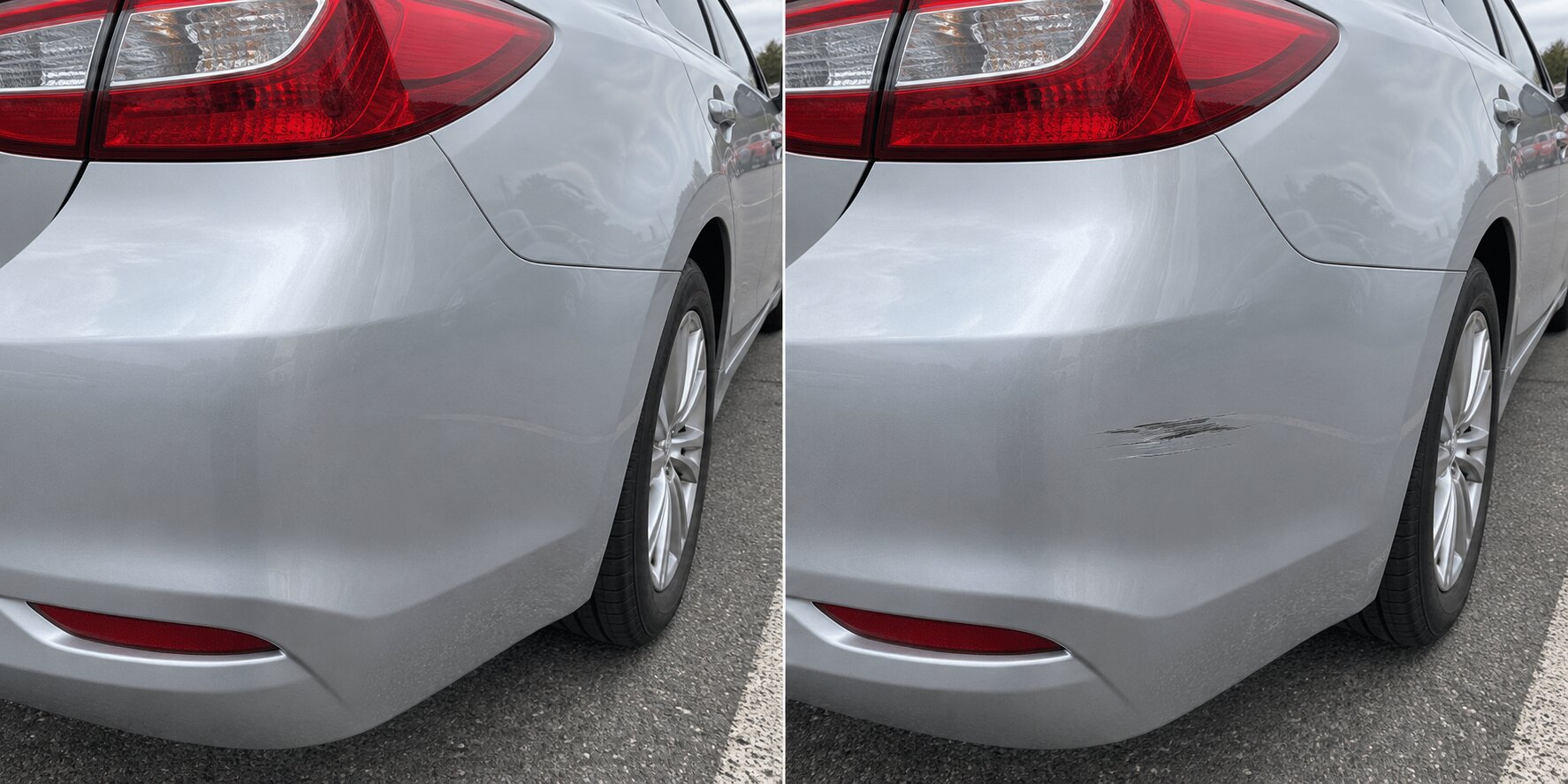
Visible change recorded
A dark scuff is visible on the rear passenger-side bumper in the AFTER photo. It is not visible in the matching BEFORE view.
Choose the views you need and document the starting condition.
Return to the same check and use your BEFORE views as a guide.
Compare the photos, mark useful details and add your finding and notes.
Finalize a version, print or save a PDF, and keep a restorable backup.
Also useful for borrowed equipment, RVs, boats, storage and more.
Your original photos stay unchanged. You make the final call. A report documents visible condition; it does not decide cause or fault. About BeforeAfter
Give every customer a clear before-and-after record they can review and acknowledge.
Try the Business workflow for 14 days. No payment is collected. Existing records remain accessible after the trial; new handoffs require active access.
Document what you received, keep the customer informed, capture the completed condition, and finish with one organized record both sides can reference.
Capture selected views, existing visible condition and notes as the vehicle, property, equipment or belongings enter your care.
Create a secure, expiring view-only link so the customer can review the documented record without changing it.
Return to the same record and document the same areas again when service, rental, repair or the handoff is complete.
Review BEFORE and AFTER, add final notes, finalize the record and provide the completed report to the customer.
Capture matching BEFORE and AFTER photos, review visible changes and keep one clear report.
| Included | Individual Free | Business trial |
|---|---|---|
| Availability | Available now · $0 | 14-day workflow trial · no payment collected |
| Capture, manual review & reports | Included | Included |
| Focus areas, PDF & complete backups | Included | Included |
| Private cloud sync | With a free account | With a Business account |
| Supporting files | Import existing documents | Import existing documents |
| Customer links & acknowledgements | Export a report | Included during active access |
| Templates, team roles & branding | — | Included during active access |
Checkout is not available. No payment is collected through this app. After the Business trial, existing records stay accessible; creating new handoffs requires active Business access.
Guest records stay in this browser. Download a complete backup, or use a free account and confirm Cloud copy verified.
Optional supporting photos for this view.
Your BEFORE and AFTER photos remain paired by documented view instead of being scattered through a camera roll. Review one matched view at a time. Choose your conclusion, then move to the next view.
One organized record of the views you documented BEFORE and AFTER, with your findings, review status and photo details kept together.
Keep receipts, agreements and other supporting documents with this record. Files are private and included in complete backups; customer links do not include them.
Source labels describe the input method recorded by the app, not independent authentication. Selected photos can come from a gallery or device picker; older photos may have no recorded source. Photo times show when images were added to this check, using the device clock; gallery photos may have been taken earlier. SHA-256 fingerprints describe the photo data saved by BeforeAfter. These are integrity aids, not independent trusted timestamps, forensic authentication, or a determination of legal admissibility. Guest data stays in this browser unless you export it. “Export complete backup” creates a JSON file containing the record data and photo bytes that BeforeAfter can retrieve at export time; if any referenced photo cannot be included, the export stops instead of presenting an incomplete backup as complete. When signed in, records and photos can also be stored privately in your cloud account.